Agent Teams
Agent Teams is an experimental Claude Code feature that lets a lead agent spawn and coordinate multiple specialized teammate agents working in parallel. Teammates communicate through a shared task list and direct messaging, and can optionally be displayed side-by-side in split panes (via tmux or iTerm2).
Not sure whether you need Agent Teams or just subagents? See Agents vs. subagents vs. Agent Teams.
Do you need tmux?
Short answer: no. Agent Teams works perfectly fine without tmux or any extra tools. But most people who try both modes end up preferring split-pane mode for any serious work.
The two modes compared
| Mode | How teammates appear | See all agents at once? | Best for |
|---|---|---|---|
| In-process (default, no extra tools required) | All output in one terminal window; cycle between agents with Shift+↑/↓ | No | Quick experiments, small teams (2–3 agents) |
| Split-pane (tmux or iTerm2) | Each teammate gets its own live visible pane | Yes; full command-center view | Regular use, 3+ teammates |
The official Claude Code docs state: "Split-pane mode requires tmux or iTerm2… The default is auto which uses split panes if you're already running inside a tmux session, and in-process otherwise."
Recommendation
- Just exploring Agent Teams? Skip any extra setup. The default in-process mode works great.
- Using Agent Teams regularly (especially 4+ teammates on real projects)? Set up split-pane mode. Watching your AI team work in parallel panes is a significant productivity boost.
Platform support for split-pane mode
macOS and Linux are the primary supported platforms. Split-pane mode works best there and is where most Agent Teams users run it.
| Platform | Split-pane option | Notes |
|---|---|---|
| macOS | tmux or iTerm2 | Recommended: two solid options, pick whichever you already use |
| Linux | tmux | Recommended: install via your package manager |
| Windows (WSL) | tmux inside WSL | Works, but requires WSL |
| Windows (native) | Not yet supported | Use in-process mode; Windows Terminal split-pane support is a requested feature |
What is tmux?
tmux is a free, open-source terminal multiplexer. It turns one terminal window into many by splitting it into panes running different things simultaneously: for example, a server in one pane, tests in another, logs in a third. You can also detach a session (close the window while everything keeps running) and re-attach later.
See the tmux Reference page for key bindings, session management commands, and pane navigation shortcuts.
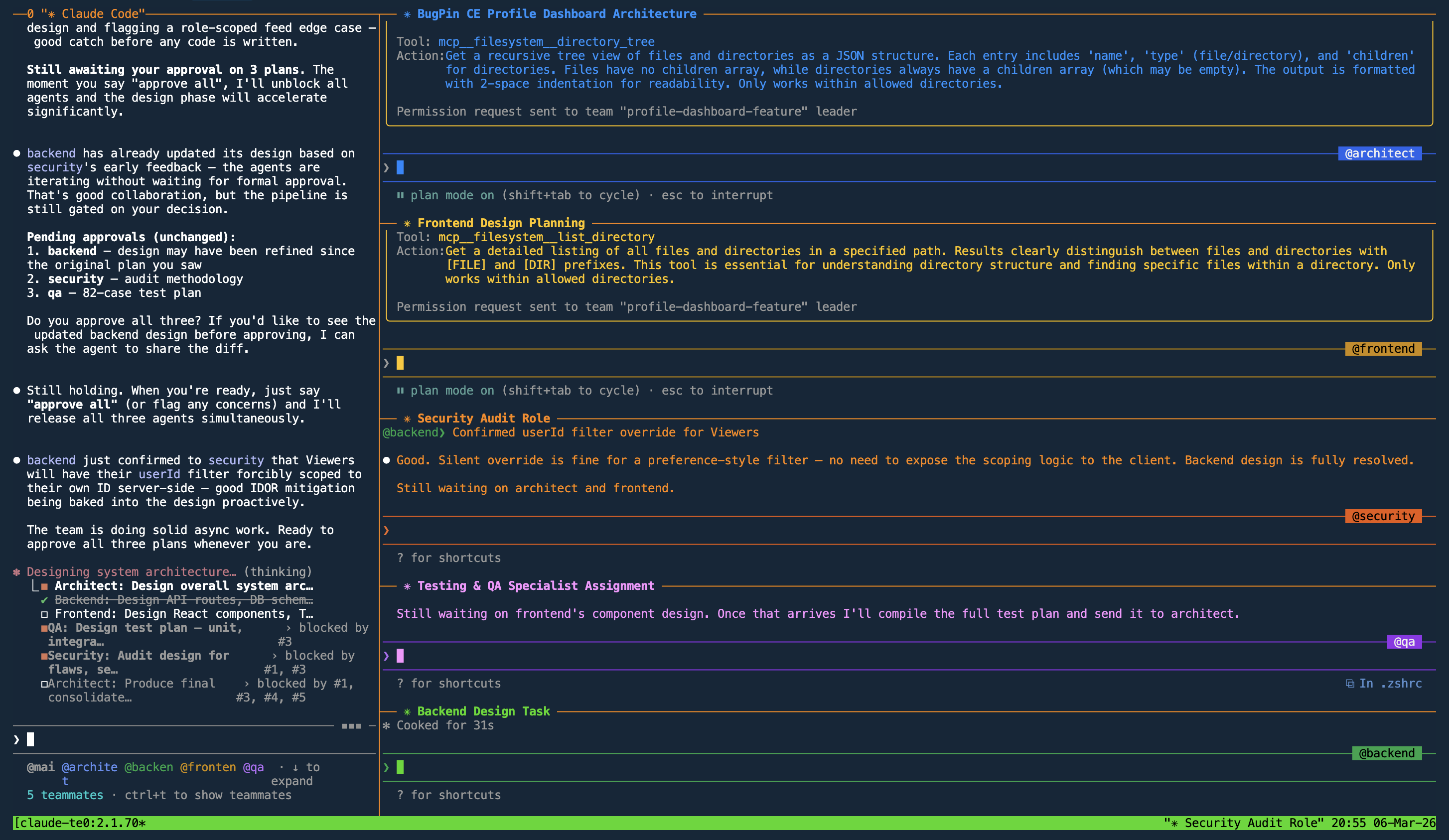
One-time setup (split-pane mode)
The steps below apply to macOS and Linux (the recommended platforms). Windows users without WSL can skip this section. In-process mode works out of the box; just set "teammateMode": "in-process" in Step B.
Step A: Install a split-pane tool
Option 1: tmux (macOS, Linux, Windows via WSL) (recommended)
macOS:
brew install tmux
Ubuntu/Debian:
sudo apt update && sudo apt install tmux
Other Linux or Windows (WSL): see the tmux installation wiki.
Option 2: iTerm2 (macOS only)
If you already use iTerm2 as your terminal, you can use it instead of tmux:
- Install the
it2CLI:brew install it2 - Enable the Python API in iTerm2: Settings → General → Magic → Enable Python API
That's it. Claude Code will detect iTerm2 automatically when teammateMode is set to "tmux" or "auto".
Step B: Configure Claude Code
Create or edit ~/.claude/settings.json:
{
  "env": {
    "CLAUDE_CODE_EXPERIMENTAL_AGENT_TEAMS": "1"
  },
  "teammateMode": "auto"
}
teammateMode options:
"auto": recommended; uses split panes if already inside tmux, otherwise falls back to in-process"tmux": always use split-pane mode (auto-detects tmux or iTerm2)"in-process": always use in-process mode (no extra tools needed)
To force a mode for a single session without editing settings.json:
claude --teammate-mode in-process
Step C: Start a tmux session (split-pane mode only)
Skip this step if you want to use in-process mode. For split-pane mode, run this before launching Claude:
tmux new-session -s claude-team
Then inside tmux, run:
claude
Your main session becomes the lead agent. Teammates automatically appear in split panes. With "auto" mode, Claude detects that it's running inside tmux and switches to split-pane mode automatically.
:::note Pro tip
Add this alias to your shell config to start the tmux session and launch Claude in one command:
- macOS (default):
~/.zshrc - Linux / older macOS:
~/.bashrc
alias claude-team='tmux new-session -s claude-team -c "$PWD" \; send-keys "claude" C-m'
After saving the file, reload it (source ~/.zshrc or source ~/.bashrc), then start Agent Teams from any project directory with:
claude-team
:::
Prompts for common workflows
Paste these into the lead agent to spin up a pre-configured team.
Full-stack feature team (5 agents)
Create an agent team for building: "User profile dashboard with dark mode toggle and real-time activity feed".

Spawn 5 teammates:
- Architect – overall design + coordination
- Backend – API routes, database models, auth
- Frontend – React components, Tailwind, state management
- QA – unit + integration tests, edge cases
- Security – finds flaws, security issues, performance problems

Rules:
- Teammates message each other directly when they need info
- Architect coordinates and has final say on design decisions
- NO plan approval required — proceed autonomously
- Write plans to .claude/plans/ before implementing
- Security and QA review AFTER implementation, not before
- Summarize all changes when complete
Why no plan approval? Adding "require plan approval" causes every agent to pause in plan mode and wait for a human response before continuing. Since you can switch between agents in the tmux session but each one is blocked, the whole team stalls. Writing plans to
.claude/plans/captures the planning artifact without blocking execution.
Code review / refactor team (4 agents)
Create a review team for the current changes / this PR / the whole src/ folder.

Spawn 4 teammates:
- Security Reviewer
- Performance & Scalability Reviewer
- UX & Accessibility Reviewer
- Test Coverage & Reliability Reviewer

Rules:
- Do NOT make any code changes — read and analyze only
- Discuss findings with each other via messages
- Use the shared task list
- When finished, write a consolidated review to .claude/review.md with severity ratings and suggested fixes
Lighter alternative: If peer discussion isn't needed, the individual security-auditor, ux-reviewer, accessibility-auditor, and api-contract-reviewer subagents cover the same ground with much lower token overhead.
Parallel debugging team (5 agents)
Users are reporting [describe bug]. Spawn 5 teammates, each with a different hypothesis:

1. Race condition in async code
2. Missing error handling / edge case
3. State management bug
4. Dependency version mismatch
5. Frontend/backend contract mismatch

Have them investigate in parallel, message each other to share evidence, and debate/disprove each other's theories. Update a shared "Findings.md" file with the winning conclusion.
Research & planning team (4 agents)
We need to decide how to implement [feature]. Create a research team with:
- Product/Requirements teammate
- Architecture teammate
- Alternatives & Tradeoffs teammate
- Cost & Complexity teammate

Let them discuss and reach consensus on the best approach. Output a final decision document with pros/cons and recommended stack.
PRD implementation: New project (7–8 agents)
Use when starting from an empty (or near-empty) directory. No existing codebase, no CLAUDE.md. Pairs with the PRD-Driven Development workflow.
Implement the new app defined in docs/prd/[app-name]/.

Use Agent Teams: spawn the teammates below as Agent Teams teammates (not regular subagents). Coordinate through the shared task list and use direct teammate messaging for signals and handoffs.

Read the PRD index first, then technical notes and shared components to understand the app, tech stack, and directory structure.

PRD identifiers used below: US (User Stories), BR (Business Rules), TC (Test Cases). Treat each US/BR/TC as an explicit, atomic requirement that must be satisfied.

Spawn 7 teammates (optionally 8):

- Init + Database Agent (opus) — reads technical notes, schema, shared components, and checklist docs. Initializes the project, creates directory structure, generates CLAUDE.md, then implements schema and seed data. Signals "scaffold-ready".
- Domain Agent (opus) — reads domain and shared components docs. Waits for "scaffold-ready". Signals "domain-ready".
- API Agent (opus) — reads API and shared components docs. Waits for "domain-ready". Signals "api-ready".
- Frontend Agent (sonnet) — reads frontend, API, and shared components docs. Waits for "api-ready". Signals "frontend-ready".
- Test Engineer Agent (sonnet) — reads US (acceptance criteria) and TC. Implements every TC as an automated test after "api-ready" and "frontend-ready". Runs the suite and reports failures to lead.
- Implementation Auditor Agent (opus) — reads the phase implementation plan, phase checklist, and the BRs + USs in scope for the phase. After each phase signals complete, cross-references every planned item, BR, and US against the actual code and reports anything planned/required but not built (or built differently). Runs before the Code Quality Agent.
- Code Quality Agent (opus) — reviews each phase against coding principles, architecture rules, layer boundaries, naming, file-size limits, and dead code. Runs after the Implementation Auditor on each phase. Reports issues to lead.

Optional for complex UI:
- UI Agent (sonnet) — reads UI (wireframes, components, interactions). Waits for "scaffold-ready", works in parallel with backend agents. Signals "ui-ready". Frontend Agent then waits for both "api-ready" and "ui-ready".

Rules:
- Auto mode: do not stop between phases. Keep going until the full PRD is implemented.
- Ambiguity in PRD: make the most defensible choice, document the assumption in your completion summary, keep moving. Do not stall.
- Flag PRD gaps to lead. No plan approval needed.
- All agents read CLAUDE.md (after Init creates it) + their PRD docs before coding.
- Handoffs: wait for the named signal (e.g. "api-ready") via teammate messaging — do not poll or re-check status.
- Ensure consistency across all layers (DB, domain, API, frontend).
- Context budget: no agent may exceed ~50% of its context window. If a task is too large, split it and spawn additional sub-agents.
- Before signaling: re-read your phase checklist, verify every item, include a completion summary.
- Git: after each phase passes all reviews, the lead creates a single commit for that phase. Use `feat: <short subject>` (~60–72 chars), blank line, then 2–4 bullets summarizing what shipped. Never push.

# Optional rules:
# Enable in split-pane mode for isolated terminal state per agent
- Each agent gets its own tmux window/pane for isolated terminal sessions.
# Enable when building production software
- Quality bar: enterprise-grade only. No "for now" code, no half-implementations, no silent failures, no skipped error paths.
# Override the default per-phase commit rule — enable when you want one controlled commit at the end (or no commits at all) instead of one per phase
- Skip per-phase commits. Teammates never touch git; the lead handles all git operations manually at the end.

Lead (opus): coordinate using the phase checklist.
After each signal, before approving the phase:
- Confirm Implementation Auditor has verified every planned item is built
- Confirm Code Quality Agent has signed off
- Confirm Test Engineer's suite passes
- Run typecheck and the full test suite — both must pass
- Ensure completeness across all layers
- Send agent back if items are missing or quality issues remain
- Next phase proceeds only when all three reviews pass

Final verification:
- Confirm all acceptance criteria are met
- Confirm all implementation phases are complete
- Verify full flow works end-to-end
- Summarize completed work and deviations
How the pipeline flows: Init + Database Agent runs first and generates CLAUDE.md. Domain, API, and Frontend agents chain in sequence. After each phase, three reviews run in order — Implementation Auditor (was every planned item built?), Code Quality (does it meet the principles?), Test Engineer (do tests pass?). The lead gates each transition only when all three sign off and typecheck + tests pass. For complex UI, add the optional UI Agent running in parallel with backend agents.
PRD implementation: Existing app (7–8 agents)
Use when adding a feature to an app that already exists — CLAUDE.md, directory structure, and patterns are established. Pairs with the PRD-Driven Development workflow.
Implement the feature defined in docs/prd/[feature-name]/.

Use Agent Teams: spawn the teammates below as Agent Teams teammates (not regular subagents). Coordinate through the shared task list and use direct teammate messaging for signals and handoffs.

Read CLAUDE.md, the PRD index, and shared components sections.

PRD identifiers used below: US (User Stories), BR (Business Rules), TC (Test Cases). Treat each US/BR/TC as an explicit, atomic requirement that must be satisfied. Review the existing app code before spawning — use subagents and tools (search, grep, file listing) to explore the codebase efficiently rather than reading files sequentially in the main context.

Spawn 7 teammates (optionally 8):

- Database Agent (sonnet) — reads schema and shared components docs. Additive only. Signals "schema-ready".
- Domain Agent (opus) — reads domain and shared components docs. Waits for "schema-ready". Signals "domain-ready".
- API Agent (opus) — reads API and shared components docs. Waits for "domain-ready". Extends existing router (no parallel routes). Signals "api-ready".
- Frontend Agent (sonnet) — reads frontend, API, and shared components docs. Waits for "api-ready". Extends existing navigation and UI patterns. Signals "frontend-ready".
- Test Engineer Agent (sonnet) — reads US (acceptance criteria) and TC. Implements every TC as an automated test after "api-ready" and "frontend-ready". Runs the full suite (new + existing) and reports failures or regressions to lead.
- Implementation Auditor Agent (opus) — reads the phase implementation plan, phase checklist, and the BRs + USs in scope for the phase. After each phase signals complete, cross-references every planned item, BR, and US against the actual code and reports anything planned/required but not built (or built differently). Runs before the Code Quality Agent.
- Code Quality Agent (opus) — reviews each phase against the project's coding principles, architecture rules, layer boundaries, naming, file-size limits, and dead code. Runs after the Implementation Auditor on each phase. Reports issues to lead.

Optional for complex UI:
- UI Agent (sonnet) — reads UI (wireframes, components, interactions). Waits for "schema-ready", works in parallel with backend agents. Signals "ui-ready". Frontend Agent then waits for both "api-ready" and "ui-ready".

Rules:
- Auto mode: do not stop between phases. Keep going until the full PRD is implemented.
- Ambiguity in PRD: make the most defensible choice, document the assumption in your completion summary, keep moving. Do not stall.
- Flag PRD gaps to lead. No plan approval needed.
- All agents read CLAUDE.md + their PRD docs before coding.
- When reviewing existing code, use subagents and tools to explore the codebase efficiently — do not read files one-by-one in main context.
- Always extend existing patterns; do not introduce duplicate logic or parallel implementations.
- Changes must be additive and must not break existing functionality.
- No modifications outside feature scope without lead approval.
- If regressions occur: signal "blocked" and report affected areas.
- Handoffs: wait for the named signal (e.g. "api-ready") via teammate messaging — do not poll or re-check status.
- Ensure consistency across all layers (DB, domain, API, frontend).
- Context budget: no agent may exceed ~50% of its context window. If a task is too large, split it and spawn additional sub-agents.
- Before signaling: re-read your phase checklist, verify every item, include a completion summary.
- Git: after each phase passes all reviews, the lead creates a single commit for that phase. Use `feat: <short subject>` (~60–72 chars), blank line, then 2–4 bullets summarizing what shipped. Never push.

# Optional rules:

# Enable in split-pane mode for isolated terminal state per agent
- Each agent gets its own tmux window/pane for isolated terminal sessions.

# Enable when building production software
- Quality bar: enterprise-grade only. No "for now" code, no half-implementations, no silent failures, no skipped error paths.

# Override the default per-phase commit rule — enable when you want one controlled commit at the end (or no commits at all) instead of one per phase
- Skip per-phase commits. Teammates never touch git; the lead handles all git operations manually at the end.

Lead (opus): coordinate using the phase checklist.
After each signal, before approving the phase:
- Confirm Implementation Auditor has verified every planned item is built
- Confirm Code Quality Agent has signed off
- Confirm Test Engineer's suite passes with no regressions
- Run typecheck and the full test suite — both must pass and existing tests must still pass
- Ensure no gaps across DB, domain, API, and frontend
- Send agent back if items are missing or quality issues remain
- Next phase proceeds only when all three reviews pass

After all done: verify all acceptance criteria and the end-to-end verification checklist. Summarize completed work, deviations, and modified files.
How the pipeline flows: Database Agent runs first with additive-only schema changes. Domain, API, and Frontend agents chain in sequence. After each phase, three reviews run in order — Implementation Auditor (was every planned item built?), Code Quality (does it meet the principles?), Test Engineer (do new and existing tests pass, no regressions?). The lead gates each transition only when all three sign off and typecheck + the full test suite pass. Agents use subagents and tools for codebase exploration rather than reading files sequentially. For complex UI, add the optional UI Agent running in parallel with backend agents.
Useful commands while the team is running
| Action | How |
|---|---|
| Talk to a specific teammate (tmux) | Click that pane |
| Talk to a specific teammate (in-process) | Cycle with Shift+↑ / Shift+↓ |
| Toggle the shared task list | Ctrl+T |
| Pause before proceeding | Tell the lead: "Wait for your teammates to complete their tasks before proceeding" |
| Shut everything down | Tell the lead: "Clean up the team" |
Git worktrees for parallel agents
When multiple agents edit the same codebase, they can conflict with each other. Git worktrees solve this by giving each agent an isolated copy of the repository on its own branch.
How it works
A git worktree creates a separate working directory linked to the same repository. Each agent works in its own directory on its own branch, so file edits never collide:
# Create worktrees for each agent's branch
git worktree add ../feature-api feature/api-endpoints
git worktree add ../feature-ui feature/ui-components
git worktree add ../feature-tests feature/test-coverage
Each agent runs in its own worktree directory. When all agents finish, merge the branches back.
Agent Teams + worktrees
When using Agent Teams with split-pane mode, you can assign each teammate a worktree:
Create a team of 3 agents. Each agent should work in its own git worktree:
- Backend agent: ../feature-api branch
- Frontend agent: ../feature-ui branch
- Test agent: ../feature-tests branch

Coordinate through the shared task list. When all agents complete their tasks,
I will merge the branches manually.
This combination gives you parallel execution with full file isolation, eliminating the risk of agents overwriting each other's changes.
When NOT to use Agent Teams
Agent Teams adds real overhead. Skip it when:
- The task is straightforward. A single Claude Code session handles most bug fixes, refactors, and single-feature implementations better than a team. Vanilla Claude Code outperforms orchestrated workflows for smaller tasks.
- The work is sequential. If step 2 depends entirely on step 1's output, parallelizing adds cost without saving time.
- You are exploring or debugging. Interactive back-and-forth with one agent is more efficient than coordinating a team when you do not yet know what needs to be done.
- Context is cheap. If your task fits comfortably in a single context window, the overhead of multiple agents is wasted.
Use Agent Teams when you have genuinely independent workstreams (frontend + backend + tests), need multiple perspectives simultaneously (parallel code review), or when a single agent's context window would overflow from the scope of work.
Cross-session messaging
Agent Teams coordinates teammates within a single orchestration. Separate Claude Code sessions you start independently can also message each other directly. On macOS and Linux (requires Claude Code v2.1.224 or later), Claude discovers your other running sessions with the ListAgents tool and sends a message with SendMessage, either when you ask it to or on its own when a change in one session affects what another is working on.
A message is text Claude writes for the other session, never your conversation history or files. Run /list-agents to see which sessions the current one can reach. The receiving session shows a Message from row once Claude has read the message; press Ctrl+O to expand it.
For example, with two sessions open on the same machine, ask one to pass something along:
Tell the session working on the payments API that users.name is now users.display_name
Tips
- Start small: 3-5 teammates max; token cost scales with every agent.
- Right model for the job: use Haiku for simple/mechanical tasks, Sonnet or Opus for complex reasoning.
- Plans without blocking: instead of "require plan approval", tell agents to write plans to
.claude/plans/first. You get the artifact without every agent stalling in plan mode waiting for input. - Two-session workflow: for very large projects, run one tmux session for a research team and a separate one for the implementation team.
- Use git worktrees for file isolation when agents edit overlapping parts of the codebase.
Token cost vs. context isolation
Running a team is more expensive than a single agent. Each teammate is an independent Claude session with its own context window, so a 5-agent team can consume roughly 5× the tokens of one agent working alone over the same wall-clock time.
The trade-off is real: more agents = more tokens, but safer context per agent.
| Factor | Single agent | 5-agent team |
|---|---|---|
| Token usage | Lower | ~5× higher |
| Context per agent | Grows large over time | Stays small and focused |
| Risk of context overload | Higher on long tasks | Lower (each agent sees only its slice) |
| Parallel throughput | Sequential | Parallel |
Practical guidance:
- Use Haiku for teammates doing mechanical work (searching, linting, testing). Reserve Sonnet/Opus for the agents that need to reason deeply.
- Avoid spawning agents just to parallelize; only split work that is genuinely independent.
- For a quick task that one agent can finish in a few turns, skip Agent Teams entirely. Parallel subagents are the lighter option if you still need some concurrency.