Skills
Skills are reusable prompt templates that let you encode recurring tasks, team conventions, and workflows into short, invocable commands. Instead of re-typing the same instructions every session, you define them once and invoke them with a / prefix.
Claude Code has the most mature built-in support for skills. Other tools offer partial equivalents, which are covered in the Using skills with other tools section below.
What are skills?
In Claude Code, a skill is a directory whose main file is SKILL.md. Claude Code loads skills from .claude/skills/ (and from your user-level skills directory; see Skill priority). The directory name becomes the slash command: .claude/skills/review/SKILL.md is invoked as /review.
YAML frontmatter on SKILL.md carries the skill name and a short description so Claude can discover when it applies; the markdown body and any sibling files in the folder supply the instructions and supporting resources Claude loads on demand.
Video length: about 3 minutes
Creating your first skill
In this walkthrough you build a skill from the ground up (the steps use a review skill; the same layout works for a PR description flow or any other command). It shows how to shape SKILL.md, invoke the skill with /review, and how Claude picks a skill from what you ask. Skill priority explains which definition wins when two skills share a name.
Video length: about 4 minutes
Create the files
From the repository root, add a folder under .claude/skills/ whose name will be your command (here, review):
mkdir -p .claude/skills/review
Create SKILL.md inside it with YAML frontmatter and the body Claude should follow when the skill runs:
# .claude/skills/review/SKILL.md

---

name: review
description: Review staged git changes for bugs, regressions, and missing tests

---

Review the staged git changes and provide a concise summary of:

- What was changed and why
- Any potential bugs or regressions introduced
- Missing tests or edge cases
- Whether the commit message accurately describes the changes
Invoke it in Claude Code:
/review
The older flat-file format .claude/commands/review.md still works for backward compatibility. The directory format is recommended because it supports supporting files, scripts, and richer frontmatter (see Configuration and multi-file skills).
Skill priority
If two skills share the same name (for example, one in the repo and one under your home directory), Claude Code applies a single precedence chain. Items nearer the top override items below; for a given name, only the highest-listed source is used:
- Enterprise (organization-managed settings)
- Personal (
~/.claude/skillson your machine) - Project (
.claude/skillsin the checked-out repository) - Plugins (skills that ship with installed plugins)
That order lets companies ship non-negotiable standards while individuals and teams can still add skills for everything else. If your org defines an enterprise code-review skill and you add a personal code-review skill, Claude uses the enterprise definition.
Project-level vs user-level paths
| Location | Scope | Use case |
|---|---|---|
.claude/skills/<name>/SKILL.md | Project-specific, shared via git | Team workflows, project conventions |
~/.claude/skills/<name>/SKILL.md | Personal, all repositories | Your own recurring prompts |
Commit .claude/skills/ to source control when you want the whole team to share the same definitions. Personal skills in ~/.claude/skills stay on your machine and apply everywhere unless an enterprise or project skill with the same name wins the precedence chain above.
Live change detection
Claude Code watches skill directories for file changes. Adding, editing, or removing a skill under ~/.claude/skills/ or .claude/skills/ takes effect within the current session without restarting. Creating a top-level skills directory that did not exist when the session started requires restarting Claude Code.
Configuration and multi-file skills
This walkthrough goes past the basics: the full metadata surface on SKILL.md, wording descriptions so invocation stays predictable, tightening which tools a skill may use for sensitive flows, and splitting large skills into supporting files so details load only when needed (progressive disclosure). The emphasis is stronger skills that still avoid loading instructions you are not using yet.
Video length: about 4 minutes
Skill Metadata Fields
The open standard for Agent Skills defines YAML frontmatter keys in SKILL.md. All fields are optional, but description is strongly recommended so Claude knows when to use the skill:
name(optional): Stable identifier for the skill. Use only lowercase letters, numbers, and hyphens, at most 64 characters. If omitted, uses the directory name.description(recommended): Plain-language guidance for when Claude should load the skill. Claude leans on this field heavily for matching, so treat it as the primary tuning knob. The combineddescriptionandwhen_to_usetext is capped at 1,536 characters in the skill listing; put the key use case first.when_to_use(optional): Additional context for when Claude should invoke the skill, such as trigger phrases. Appended todescriptionin the skill listing and counts toward the 1,536-character cap.argument-hint(optional): Hint shown during autocomplete to indicate expected arguments. Example:[issue-number].arguments(optional): Named positional arguments for$namesubstitution in skill content. Accepts a space-separated string or a YAML list. Names map to argument positions in order. Example:arguments: [issue, branch]maps$issueto the first argument and$branchto the second.disable-model-invocation(optional): Set totrueto prevent Claude from automatically loading this skill. Only you can invoke it with/skill-name. Use for workflows with side effects like/deploy.user-invocable(optional): Set tofalseto hide from the/menu. Use for background knowledge users shouldn't invoke directly.allowed-tools(optional): Pre-approves tools Claude may call without a permission prompt during the turn that invokes the skill (space/comma-separated or YAML list). It does not restrict other tools, and the grant clears after your next message.disallowed-tools(optional): Removes tools from Claude's pool while the skill is active (space/comma-separated or YAML list). Clears after your next message.model(optional): Selects which Claude model runs when this skill is in use.effort(optional): Effort level for this skill. Options:low,medium,high,xhigh,max. Overrides the session effort level. Available levels depend on the active model.context(optional): Set toforkto run the skill in an isolated subagent context.agent(optional): Which subagent type to use whencontext: forkis set. Options:Explore,Plan,general-purpose, or any custom agent name.background(optional, defaulttrue): Withcontext: fork, set tofalseto wait for the forked subagent's result in the invoking turn instead of running it in the background.hooks(optional): Hooks scoped to this skill's lifecycle.paths(optional): Glob patterns that limit when this skill is activated automatically by Claude.shell(optional): Shell to use for!`command`and```!blocks in this skill. Acceptsbash(default) orpowershell. Settingpowershellruns inline shell commands via PowerShell on Windows.metadata,license,compatibility(optional): Part of the Agent Skills spec. Claude Code accepts them but does not act on them:metadataholds free-form key-value data for your own tooling,licensenames the skill's license, andcompatibilityrecords environment requirements (up to 500 characters).
String substitutions
Skills support string substitution for dynamic values in skill content:
| Variable | Description |
|---|---|
$ARGUMENTS | All arguments passed when invoking the skill |
$ARGUMENTS[N] | A specific argument by 0-based index ($ARGUMENTS[0] for the first) |
$N | Shorthand for $ARGUMENTS[N] ($0 for first, $1 for second) |
$name | Named argument declared in the arguments frontmatter list (e.g. with arguments: [issue, branch], $issue maps to the first argument) |
${CLAUDE_SESSION_ID} | The current session ID, useful for logging or session-specific files |
${CLAUDE_EFFORT} | The current effort level: low, medium, high, xhigh, or max. Use to adapt skill instructions to the active effort setting |
${CLAUDE_SKILL_DIR} | The directory containing the skill's SKILL.md file. Use this to reference bundled scripts regardless of where the skill is installed |
${CLAUDE_PROJECT_DIR} | The project root directory (the same path hooks and MCP servers receive). Works in skill content and in allowed-tools Bash rules. Requires v2.1.196+ |
${CLAUDE_PLUGIN_ROOT} | Plugin skills only: the plugin's installation directory, for referencing bundled scripts and files |
${CLAUDE_PLUGIN_DATA} | Plugin skills only: the plugin's persistent data directory, which survives updates |
Named positional arguments can be declared in frontmatter with the arguments field. Names map to argument positions in order:
---
name: fix-issue
arguments: [issue, branch]
---
Fix issue $issue on branch $branch.
Running /fix-issue 123 main maps $issue to 123 and $branch to main.
Example: a skill that fixes a GitHub issue by number:
---
name: fix-issue
description: Fix a GitHub issue by number
disable-model-invocation: true
---
Fix GitHub issue $ARGUMENTS following our coding standards.
Running /fix-issue 123 replaces $ARGUMENTS with 123.
Dynamic context injection
Use !`command` syntax to run shell commands before the skill content is sent to Claude. The output replaces the placeholder, so Claude receives actual data rather than the command itself:
---
name: pr-summary
description: Summarize changes in a pull request
context: fork
agent: Explore
allowed-tools: Bash(gh *)
---

## Pull request context
- PR diff: !`gh pr diff`
- PR comments: !`gh pr view --comments`
- Changed files: !`gh pr diff --name-only`

## Your task
Summarize this pull request...
For multi-line commands, use a fenced code block opened with ```!:
## Environment

```!
node --version
npm --version
git status --short
```
To disable shell command execution in skills (for security in managed environments), set "disableSkillShellExecution": true in your settings. Each command is replaced with [shell command execution disabled by policy] instead of being run. Bundled and managed skills are not affected.
Using Scripts Efficiently
Helper scripts next to SKILL.md can run without dumping their full source into the model context. When Claude invokes them through the shell, you mostly pay tokens for what the process prints (and any errors you surface), not for the script body. In the skill instructions, say clearly to run the file, not to open it and summarize or rewrite it.
Strong fits include:
- Validating environments, credentials, or dependencies before work starts
- Fixed-format parsing, normalization, or small ETL steps you want identical every time
- Behavior you keep in versioned, tested code instead of re-deriving in the chat transcript
Skills vs. other Claude Code features
Claude Code gives you several ways to steer behavior. If you mix the wrong ones, you duplicate rules or burn context for no gain. The subsections below contrast skills with CLAUDE.md, subagents, and hooks. For connecting to external tools and data, see MCP.
CLAUDE.md vs Skills
CLAUDE.md is always on: it loads for every turn in that project. Example: if TypeScript strict mode should never be negotiable here, put it in CLAUDE.md.
Video length: about 3 minutes
Skills load only when they match the task. After a match, their instructions merge into the active conversation. A PR review rubric does not need to sit in context while you are implementing a feature; it can stay dormant until you ask for a review.
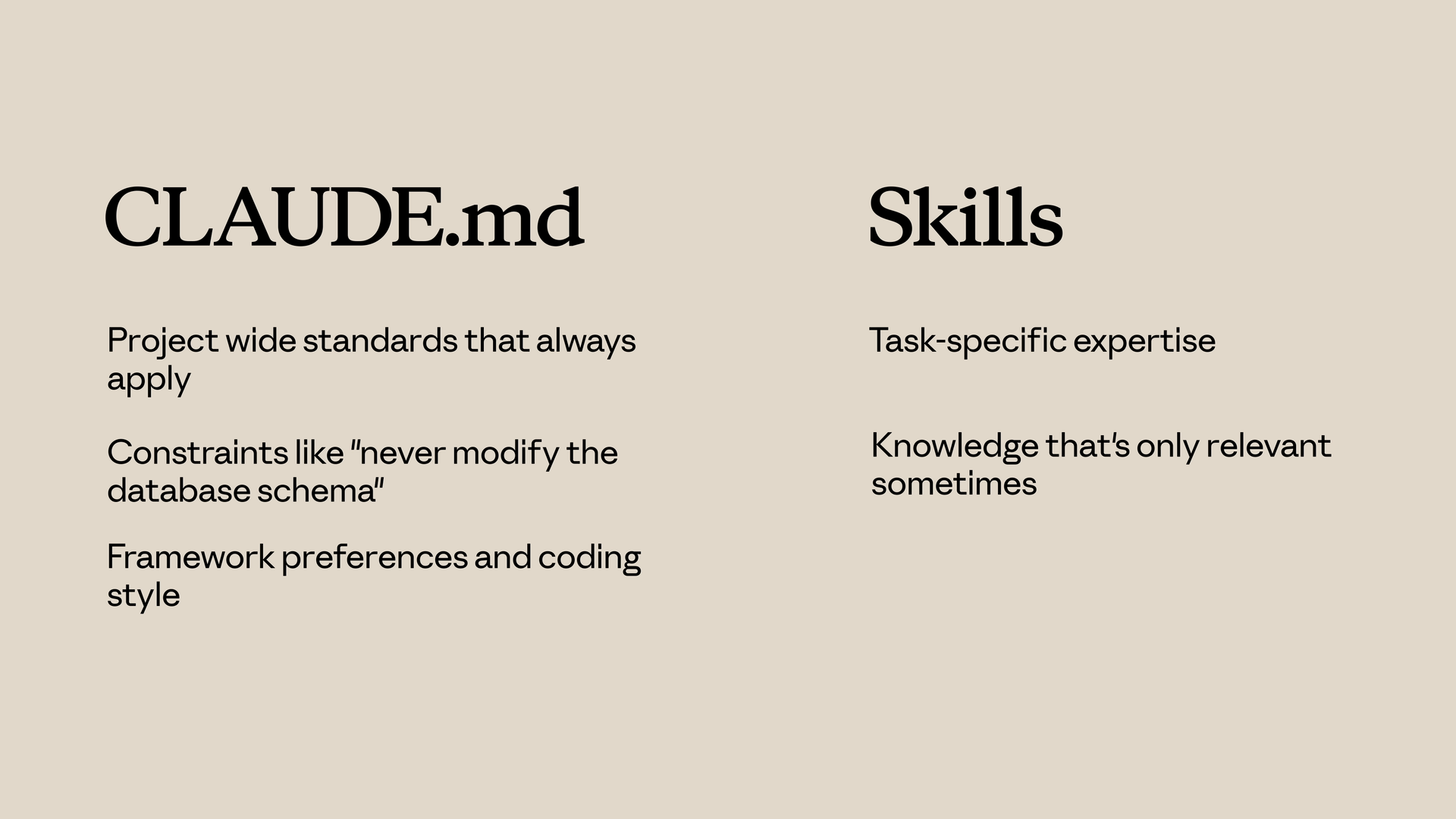
Prefer CLAUDE.md when you need:
- Project-wide standards that should always apply
- Hard constraints (for example, "never change the database schema without a migration")
- Framework choices, libraries, and house coding style
Prefer skills when you need:
- Task-specific playbooks or domain detail
- Knowledge that matters only for some requests
- Long procedures that would clutter every session if they lived in
CLAUDE.md
Skills vs Subagents
A skill augments the current session: when it activates, its text joins the same conversation you are already in.
A subagent runs in a separate session. You give it a brief, it works with its own context and tool policy, then it hands results back. That isolation is the point.
Reach for subagents when:
- The work should run in its own execution context, not inline with the main thread
- You want different tool access or a tighter scope than the main conversation
- You need a firewall between exploratory or risky work and your primary chat
Reach for skills when:
- You want extra instructions available inside the main conversation
- The guidance should apply across many turns in the same thread, not as a one-off delegation
Skills vs Hooks
Hooks are event-driven: they run when something happens (for example, after a save, or before a tool call). Typical uses include linting, guards, or small automations tied to Claude's actions.
Skills are request-driven: they turn on from what you are trying to do and how the skill is described, not from a lifecycle hook firing.
Prefer hooks when:
- Something must run on every occurrence of an event (every save, every edit, and so on)
- You need validation or policy checks at specific tool boundaries
- You want side effects that do not belong in free-form instructions
Prefer skills when:
- You are shaping judgment: how to plan, review, or implement
- The content is guidance and examples, not a script tied to a single event
Sharing skills
Skills compound when a team or organization runs the same definitions. This walkthrough compares three ways to ship them (commit .claude/skills/ with the repo, package them in plugins, or push them through enterprise-managed settings), then shows how to attach skills to custom subagents. One sharp edge to internalize: subagents do not inherit skills from the main session unless you preload them explicitly.
Video length: about 4 minutes
Skills and Subagents
Subagents do not pick up skills just because the main chat already loaded them. Delegation starts a separate context, so anything the subagent should rely on has to be declared on that agent (or repeated in the task you send).
Keep three distinctions straight:
- Built-in agent types (for example Explore and Plan) are fixed presets. They do not preload your custom skill definitions from the repo the way a custom agent can with a
skillslist in frontmatter. - Custom agents under
.claude/agents/can preload skills, but only when you name them explicitly in YAML. - Preloaded skills inject their full bodies at agent startup. That is different from the main conversation, where skills can be matched and loaded as the dialog moves.
Author the file under .claude/agents/, or run /agents in Claude Code and describe the role when prompted:
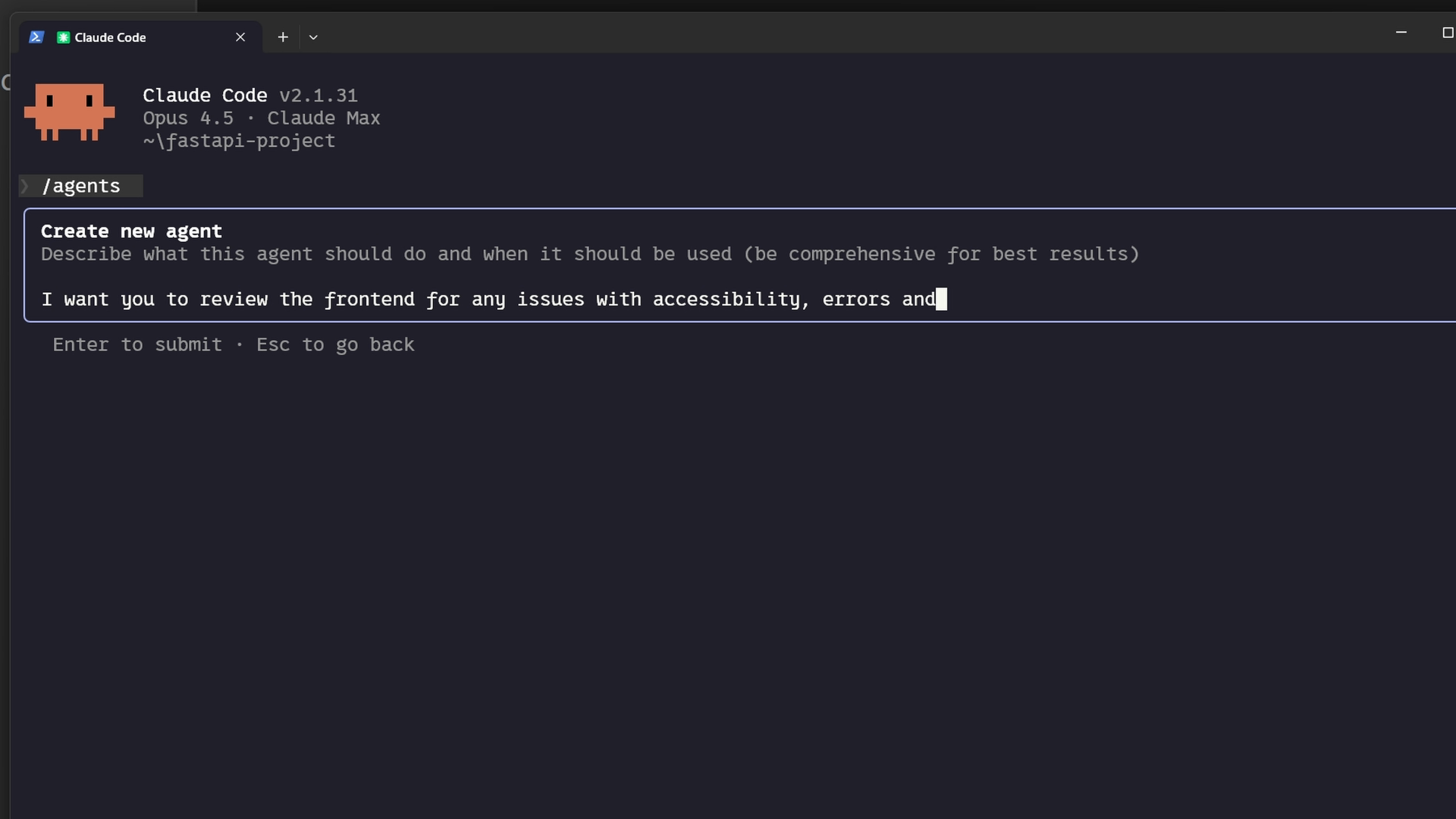
The scaffold includes a skills array listing which skill packages to load. Example frontmatter:
---
name: frontend-security-accessibility-reviewer
description: 'Use this agent when you need to review frontend code for accessibility...'
tools: Bash, Glob, Grep, Read, WebFetch, WebSearch, Skill...
model: sonnet
color: blue
skills: accessibility-audit, performance-check
---
After you delegate to that agent, both skill bodies stay in its context for the whole run. Create the skill folders first under .claude/skills/ (or your user-level skills directory), then either generate a new agent with /agents or add skills: to an existing agent markdown file.
Good fit when:
- You want isolation and a stable bundle of expertise for that worker
- Different agents need different skill sets (frontend reviewer versus API reviewer, for example)
- You want checklists and conventions enforced in delegated work without pasting them into every prompt
See Subagents for the full picture (built-in types, when to delegate, and tips). For agent files and /agents, jump to Creating custom subagents.
Troubleshooting skills
Video length: about 4 minutes
When a skill misbehaves, it usually fits one of a few patterns: it never activates, it does not show up in the roster, Claude picks a different skill, or something breaks while the skill runs. Most fixes are small once you know which pattern you are seeing.
Use the skills validator
Claude Code has a built-in validator (v2.1.233+). Point it at a skill directory to check that each SKILL.md's frontmatter parses:
claude plugin validate .claude/skills
Add --debug to surface parse errors, or --strict to treat warnings as errors. Running this first flags structural issues up front so you do not burn time debugging the wrong layer.
Skill does not trigger
The skill validates, but Claude does not apply it when you think it should. The usual cause is the description field in SKILL.md frontmatter.
Matching is semantic: your chat wording has to overlap what the description claims the skill is for. Weak overlap means no match.
- Align the description with how you (and teammates) actually phrase requests.
- Add concrete trigger phrases people would say out loud.
- Try variants such as "help me profile this," "why is this slow?," and "make this faster."
- If a variant never pulls the skill in, add those terms to the description.
Skill does not load
If Claude omits the skill when you ask what is available, check layout and naming first:
SKILL.mdmust sit inside a named folder under the skills root, not alone at the root beside other skills.- The filename must be exactly
SKILL.md:SKILLin all caps, extension.mdin lowercase.
For loader errors, run:
claude --debug
Watch the log for lines that mention your skill name; they often point straight at the fault.
Wrong skill gets used
Claude reaches for a different skill or wavers between two. Descriptions are probably too close in meaning. Narrow and differentiate them so scope and triggers are obvious. Specific descriptions improve routing and cut down collisions with similar skills.
Plugin skills do not appear
You installed a plugin but its skills never show up.
- Clear the Claude Code cache, restart Claude Code, then reinstall the plugin.
- If skills are still missing, the plugin bundle layout may not match what Claude Code expects. This is a good time to run the skills validator, or compare the plugin against a known-good package.
Runtime errors
The skill loads but fails while it runs. Typical causes:
- Missing dependencies: If the skill relies on external packages, they must be installed in the environment where Claude runs the skill. Document requirements in the skill body or description so Claude and humans know what to install.
- Permissions: Scripts need execute permission. Example:
chmod +x path/to/your-script.sh
- Path separators: Prefer forward slashes in paths even on Windows so references behave the same everywhere.
Skill descriptions are getting cut short
When you have many skills, Claude Code truncates description text to fit a character budget (1% of the context window by default). Skills you use least get collapsed to bare names first. Use /skill-doctor (v2.1.252+) to report each skill's token cost and usage frequency and see which are affected or unused.
To expand the budget, set skillListingBudgetFraction in settings (for example, 0.02 for 2%) or reduce low-priority skill descriptions. You can also control how individual skills appear using skillOverrides:
{
  "skillOverrides": {
    "legacy-context": "name-only",
    "deploy": "off"
  }
}
Valid skillOverrides values:
"on"(default): full description shown to Claude"name-only": name listed but description hidden (skill still usable)"user-invocable-only": hidden from Claude's automatic selection, still visible in the/menu"off": hidden from both Claude and the/menu
The /skills menu can write this setting for you: highlight a skill and press Space to cycle through states.
Quick troubleshooting checklist
- Never triggers: Improve
descriptionand add trigger phrases you actually use in chat. - Does not load: Check folder layout, exact
SKILL.mdfilename, and YAML frontmatter syntax. - Wrong skill: Make overlapping descriptions more distinct.
- Descriptions cut short: Run
/skill-doctorto check per-skill cost and budget overflow; useskillOverridesorskillListingBudgetFractionto manage it. - Shadowed: Two definitions can share a name; only the winner in the precedence chain applies. See Skill priority and rename or consolidate if needed.
- Plugin skills missing: Clear cache, restart, reinstall; then validate plugin structure.
- Runtime failure: Dependencies, executable bits on scripts, and path style.
Do you need skills?
You don't strictly need skills to use Claude Code. You can chat, run subagents, and edit code without them. But once you use them, it's hard to go back, because they solve the most common frustrations people hit after the first few days.
| Without skills | With skills |
|---|---|
| Repeating the same instructions every session ("always use Tailwind dark mode", "follow our security checklist") | Claude applies your rules automatically when relevant |
| Results vary from session to session | Consistent, repeatable output every time |
Long CLAUDE.md files that eat into your context window | Instructions load only when needed, on demand |
| Subagents starting from scratch every time | Skills can preload into any subagent, giving it your rules from the start |
The short version: skills are reusable expert recipes that Claude keeps in its back pocket and pulls out when the task matches. Subagents are the specialist workers you assign tasks to. Most people end up using both together.
Context mechanisms in Claude Code
Claude Code has four overlapping ways to give it persistent context and instructions. Understanding how they differ helps you put the right information in the right place.
| CLAUDE.md | Subagents | Commands | Skills | |
|---|---|---|---|---|
| Auto-loaded every session | Yes | No | No | No (invoked on demand) |
| Token cost | Always in context | Per-session, isolated | Loaded at invocation | Loaded at invocation |
| Can execute tools / run code | No | Yes | Yes | Yes |
| Shareable via git | Yes | Yes (.claude/agents/) | Yes (.claude/commands/) | Yes (.claude/skills/) |
| Best for | Project-wide rules that always apply | Delegating isolated specialist tasks | Reusable prompt workflows | Reusable prompt workflows |
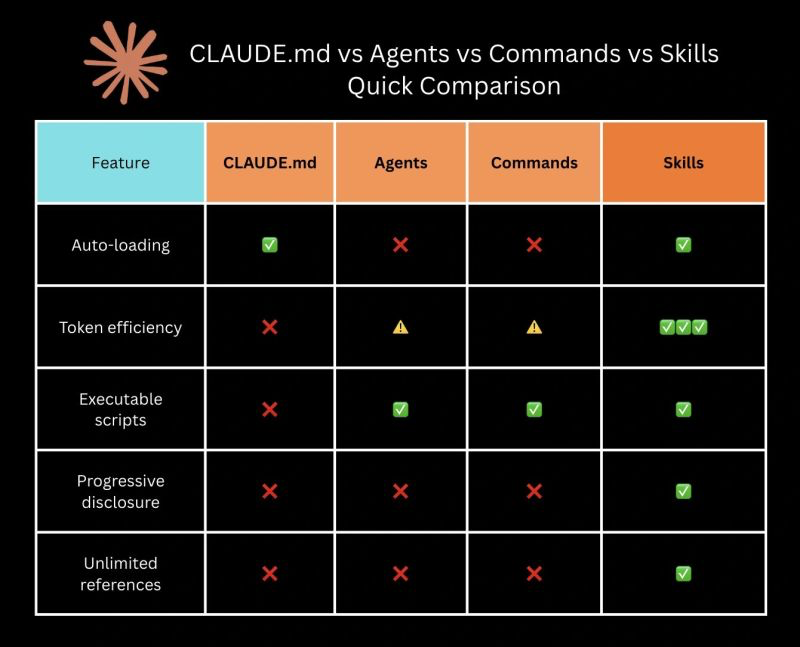
In Claude Code, Commands and Skills have merged: skills live in .claude/skills/<skill-name>/SKILL.md, while the older .claude/commands/<name>.md format still works for backward compatibility. Both create the same /slash-command. Skills are recommended because they support additional features: a directory for supporting files, frontmatter to control invocation, and automatic loading by Claude when relevant.
Preloaded skills vs. on-demand skills
Skills can be used in two fundamentally different ways:
On-demand skills (the default) are invoked explicitly by the user or by a command using /skill-name. They load into context only when called.
Preloaded (agent) skills are specified in a subagent's frontmatter via the skills field. Their full content is injected into the agent's context at startup, giving the agent background knowledge without needing to invoke anything:
# .claude/agents/api-builder.md
---
name: api-builder
skills: ['rest-conventions', 'error-handling-patterns']
---
Build API endpoints following our conventions.
The api-builder agent starts every session already knowing your REST conventions and error handling patterns. It does not need to call /rest-conventions; the knowledge is already in its context.
When to use which:
- On-demand: workflows you invoke for a specific task (review, scaffold, generate tests)
- Preloaded: domain knowledge and conventions that an agent needs for every task it handles
For more on how commands, agents, and skills compose together, see Workflows & Orchestration.
A practical rule of thumb:
- CLAUDE.md: conventions, constraints, and background context that should always be active
- Skills (commands): workflows and prompt recipes that you invoke for a specific task
- Subagents: isolated specialist workers for noisy or expensive subtasks
Ready-to-use skills
Copy any of these into .claude/skills/<name>/SKILL.md (project) or ~/.claude/skills/<name>/SKILL.md (user-wide). Each file is also available to download directly.
Universal
These work well in any codebase regardless of stack or language.
review
Download review.md: staged diff review with severity-grouped findings
Runs git diff --staged (or the last commit if nothing is staged) and reviews for logic bugs, security vulnerabilities, missing error handling, performance regressions, and style inconsistencies. Reports findings grouped by severity (Critical, High, Medium, Low) with file, line, description, and suggested fix.
pr-desc
Download pr-desc.md: GitHub/GitLab-ready PR title and body from branch diff
Compares the current branch against main using git log and git diff --stat, reads the most relevant changed files, and generates a Markdown PR description with title, summary bullets, file-by-file changes, test plan checklist, and notes section.
Web & backend
Focused on API quality, environment configuration, and database safety.
api-review
Download api-review.md: validation, HTTP semantics, auth, and consistency review
Accepts a path (or scans all route handlers) and checks each endpoint for input validation, correct HTTP methods and status codes, error handling that does not leak internals, auth/authorization on protected routes, and design consistency (naming, pagination, rate limiting). Reports grouped by category.
env-check
Download env-check.md: missing .env.example entries, committed secrets, unvalidated variables
Audits all environment files and every place in code where env vars are accessed. Reports missing .env.example entries, committed secrets, variables read without validation or fallback, inconsistent naming, and unused variables.
db-review
Download db-review.md: SQL injection, N+1 queries, schema design, and migration safety
Accepts a path (or finds all database-related files) and checks for raw SQL injection risks, N+1 query patterns, missing indexes, schema design issues (nullability, foreign keys, varchar limits), unsafe migrations, and missing transactions. Findings rated Critical through Low.
Testing
For finding gaps in test coverage and generating new tests quickly.
test-gaps
Download test-gaps.md: untested files, functions, missing edge cases, and test quality issues
Accepts a path (or analyzes the whole project). Finds source files with no tests, functions with no coverage, tests that only cover the happy path, and tests that pass for the wrong reason. Ends with the top 5 recommended test cases by risk and an overall coverage rating.
gen-tests
Download gen-tests.md: generates a complete test file matching the existing framework and style
Accepts a file or function, detects the test framework already in use, and writes tests covering happy path, edge cases (empty, null, boundary), error conditions, and conditional branches. Matches existing naming conventions, assertion style, and directory structure.
Documentation
For generating and maintaining inline docs.
doc-this
Download doc-this.md: generates missing JSDoc, docstrings, or language-native docs to match the existing style
Accepts a file, detects the documentation style already in use (JSDoc, Python docstrings, Go/Rust doc comments), and adds missing documentation for all exported or public functions, methods, classes, and types. Skips trivial getters/setters and does not rewrite existing docs.
Planning & workflow
For product planning, requirements, and multi-agent coordination.
write-prd
Download write-prd.md: structured PRD generation using a 7-document template system
Interviews the user to determine feature size (small, medium, large, complex), then generates the appropriate subset of documents: INDEX, OVERVIEW, BUSINESS-LOGIC, DATABASE-SCHEMA, API-ENDPOINTS, IMPLEMENTATION, and IMPLEMENTATION-STEPS. Each document follows a fixed template with placeholders, so the output is ready for an AI coding session or a human reviewer.
product-vision
Download product-vision.md: guided product vision with Jira-ready epic descriptions
Runs a 5-round interview (idea, strategy, capabilities, metrics, review) and produces two files: a PRODUCT-VISION.md covering problem space, strategy, capabilities, success metrics, and roadmap, plus a JIRA-EPICS.md with copy-paste-ready epic blocks. Designed as the strategic layer above write-prd: each capability in the vision becomes a separate PRD.
agent-team-prompt
Download agent-team-prompt.md: Claude Code agent team spawning prompt generator
Reads the project's PRD (if one exists), interviews the user about team size, roles, and coordination mode (tmux or in-process), then generates a plain-text spawning prompt saved to .claude/prompts/. The output defines agents, model tiers (opus/sonnet/haiku), signal/wait chains, and coordination rules, ready to paste into the lead agent's first message.
Finding more skills
The skills on this page are a starting point. There are several good places to discover more.
Official: Anthropic Skills repository
The anthropics/skills repository on GitHub is Anthropic's official collection of agent skills. It includes production-quality examples across several categories: document creation (DOCX, PDF, PPTX, XLSX), creative and design tasks, web app testing, MCP server generation, and more. Each skill follows the SKILL.md format with YAML frontmatter (name and description) and structured instructions.
You can install skills from this repo directly in Claude Code:
/plugin marketplace add anthropics/skills
/plugin install document-skills@anthropic-agent-skills
The repository also contains a skill template and the Agent Skills specification, which are useful references if you want to author your own skills in the standard format.
Community: Skills Marketplace (SkillsMP)
The community-maintained Skills Marketplace (SkillsMP) aggregates over 270,000 agent skills from public GitHub repositories. It covers Claude Code, OpenAI Codex CLI, and ChatGPT, and provides search, category filtering, and quality indicators to help you find what you need.
A few things to keep in mind when using community skills:
- Review before installing. Community skills are open-source code from GitHub. Treat them the same way you would treat any third-party dependency: read the source before adding it to your project or home directory.
- SkillsMP is not affiliated with Anthropic. It is an independent community project.
- Quality varies. SkillsMP filters out repositories with fewer than 2 stars, but that is a low bar. Check that a skill does what you expect before relying on it.
Using skills with other tools
Skills follow the same SKILL.md folder convention across Claude Code, Codex, and Cursor, so a skill written for one tool usually needs only a change of directory to work in another. See each tool's page for detailed setup instructions:
Summary: skills support across tools
| Tool | Native skills | Project location | User location |
|---|---|---|---|
| Claude Code | Yes | .claude/skills/<name>/SKILL.md | ~/.claude/skills/ |
| Codex | Yes | .agents/skills/<name>/SKILL.md (scanned from the working directory up to the repo root) | ~/.agents/skills/ |
| Cursor | Yes | .cursor/skills/<name>/SKILL.md | ~/.cursor/skills/ |
| Gemini CLI | No | Via GEMINI.md (context only) | Shell wrappers + prompts dir |
| Grok CLI | No | No | Shell wrappers + prompts dir |
If your team uses more than one of these tools, keep one canonical skills directory in the repository and symlink it into the other tools' locations so the instructions do not drift.